Cancellation Policy
Order Cancellation Policy Guide
The Order Cancellation Policy module allows merchants to flexibly configure order cancellation rules for their shop. When the AI customer service agent handles a customer's "Cancel Order" request, it will strictly follow these rules to automatically determine if cancellation is allowed and calculate any applicable penalties.
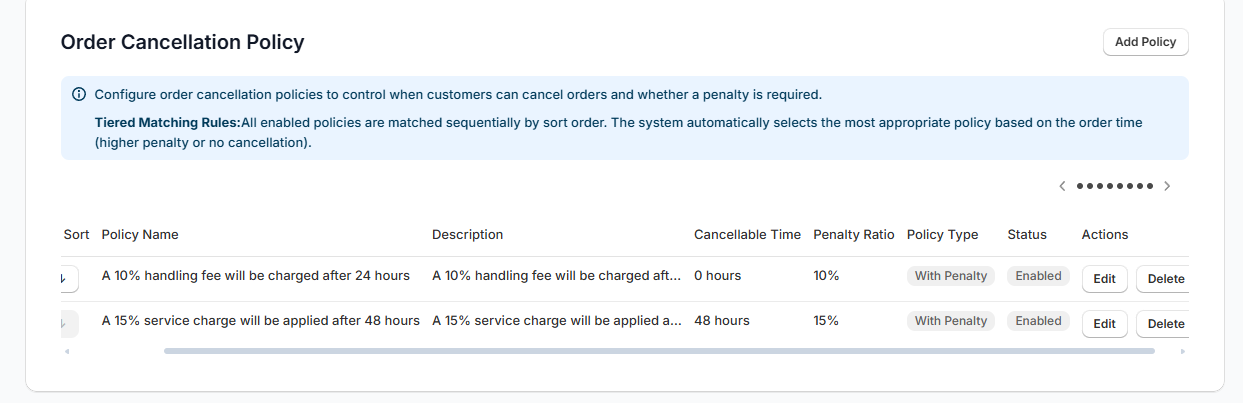
1. Core Logic: Threshold Management
The system's core logic is based on a tiered management system using Time Thresholds. The "Time Limit" you set represents the end point of the "Free Cancellation Period".
-
Free Cancellation:
- Highest Priority: If you configure a "Free Cancellation" policy, the system will default to allowing all orders to be cancelled for free (this type has no time limit), ignoring other policies.
- Use Case: During shop promotions or for shops that allow unconditional refunds.
-
With Penalty:
- Built-in Free Period: The "Time Limit" here defines the point in time when the penalty starts to apply.
- Logic:
- Order Age < Time Limit: Free Cancellation (Penalty threshold not reached).
- Order Age ≥ Time Limit: Charge Penalty (Free period exceeded).
- Example: Set "10% Penalty, Time Limit 24 hours". This means cancellation is free within 24 hours; after 24 hours, a 10% penalty is deducted.
-
No Cancellation:
- Also supports time thresholds. For example, setting "Time Limit 72 hours" means cancellation is prohibited after 72 hours.
2. Tiered Matching Example
By combining multiple policies with different time thresholds, you can achieve fine-grained tiered control. The system will automatically match the policy that best fits the current stage based on the order time.
Configuration Example: Three-Stage Management
Suppose you want to implement the following rules:
- 0 - 24 hours: Hesitation period, free cancellation.
- 24 - 48 hours: Processing period, cancellation deducts 10% fee.
- After 48 hours: Pre-shipping period, cancellation deducts 20% fee.
You only need to configure:
| Policy Name | Policy Type | Penalty % | Time Limit | Sort Order |
|---|---|---|---|---|
| Stage 1 Penalty | With Penalty | 10% | 24 | 1 |
| Stage 2 Penalty | With Penalty | 20% | 48 | 2 |
System Execution Logic:
- Customer A (Ordered 5 hours ago):
- Has not reached "Stage 1" threshold (5 < 24).
- Result: Free Cancellation.
- Customer B (Ordered 30 hours ago):
- Has exceeded "Stage 1" threshold (30 ≥ 24).
- Has not reached "Stage 2" threshold (30 < 48).
- Result: Matches "Stage 1", Deduct 10%.
- Customer C (Ordered 60 hours ago):
- Has exceeded "Stage 2" threshold (60 ≥ 48).
- Result: Matches "Stage 2", Deduct 20%.
3. Configuration Field Description
Click Settings in the left menu -> Select Order Cancellation Policy.
| Field Name | Description | Example Value |
|---|---|---|
| Policy Name | Internal identifier for management. | Penalty after 24h |
| Policy Type | Selects the core logic of the strategy. | With Penalty |
| Time Limit | Key Field. Defines the start time point for this policy to take effect.<br>Before this time, it defaults to free cancellation (or is handled by a lower-tier policy). | 24 (Means effective after 24 hours) |
| Penalty Percentage | Only effective under "With Penalty" type. | 10.0 |
| Sort Order | Recommended to sort from smallest to largest time threshold for easier management. | 1 |
4. FAQ
Q: I only want a simple rule: Free within 48 hours, no cancellation afterwards. How do I configure this? A: You only need to configure one policy:
- Type:
No Cancellation - Time Limit:
48 - Effect: 0-48 hours defaults to allowed cancellation because the prohibition threshold hasn't been reached; cancellation is prohibited after 48 hours.
Q: What happens if I configure both "Free Cancellation" and "With Penalty" policies? A: The "Free Cancellation" policy (with no time limit) has the highest priority. Once enabled, all orders will match the free cancellation policy, and other penalty policies will be ignored. Please enable with caution.
Q: How is the penalty deducted? A: For Shopify orders, the system executes a "Partial Refund". For example, if the order is $100 and the penalty is 10%, the system will refund $90 and keep $10 in the order as revenue.